Showing posts with label Search. Show all posts

Thursday, 27 June 2013

Google Search Android App Updated, Allows Voice-Activated Music Playback


Google has released some sweet new features for its Google Search app for users who are running Android 4.1 or later on their devices. Here’s what’s new:
  • Information about shows you’re watching on your internet-connected TV (US only)*
  • Saved offers when nearby a redemption location
  • New voice action: play music from your phone or the Play Store
  • Voice actions tips
  • *Requires phone/tablet to be on the same network as your TV
Now users can search and play music via voice commands on their devices, and will be notified of saved offers when in proximity to a redemption location. Look for the update to be hitting your device soon, or head over to the Google Play Store to grab the update.

Google Earth iOS Update Brings Street View, Optimized Search Results


The Google Earth app for iOS has received an update today, bringing some features from Google Maps into the app. The new update, version 7.1 brings Google Street View functionality to the app, which up until now has only been available on the web version of Google Earth and the Android Google Earth app. Search results have been optimized to make searching for locations easier, and directions now let users obtain transit, biking and walking directions in 3D. The app also has a window that can be pulled up from the bottom of the screen, dubbed the “tour guide” which pulls up virtual tours. The app also lets users browse layers which include roads, borders, places and photos. Also available are real-time earthquake maps, planes in flight, hiking trails and city tours.
The iOS Google Earth app is available now on the iTunes App Store for iPhone users running iOS 4.3 or later.

Monday, 24 June 2013

Google Updates Local Search Results On Desktop With Carousel Design

carousel

At the end of last year, Google introduced a new design for some local search results on tablets that put a carousel with the top results at the top of the page. Today, it’s bringing this design to the desktop, too. This new feature can be triggered by searches for restaurants, bars and other local places, Google says, and it’s currently rolling out in English in the U.S. and should roll out for other languages in the future.
A typical search to see this feature would be something like “Mexican restaurants in nyc.” Google will then put the carousel at the top of the page, including a photo, the standard Zagat ratings, price class and cuisine. A click on these places will bring up their Google+ Local sites with more information.
Users can click on an arrow in the right to see more places and they can use the map in the sidebar to zoom in and the carousel will automatically restrict your searches to this specific area.
Google, of course, also uses a similar design for some of its Knowledge Graph results. As a number of bloggers noticed recently, these Knowledge Graph carousel results seem to be popping up more frequently now than ever before. Given today’s addition of the local search carousel, chances are that Google’s stats show that this is a very effective way of presenting search results. I wouldn’t be surprised if the company continued to expand its use of this design element for other kinds of queries in the near future.

Saturday, 22 June 2013

Microsoft unveils Bing Boards, an experimental slideshow of images and videos in search results


Bing Boards
Microsoft continues to push the idea of Bing as a platform, with deep Windows 8.1 and Sir i integration, but the company is still trying out new features within its web search results. On Thursday, Microsoft unveiled its latest experiment: Bing Boards. Essentially, it's a visual collection of images and videos presented in a slideshow with captions and context. Microsoft says they're designed to be complementary to search results, and the company is positioning them in the sidebar alongside some of the other additional Bing features.
The software maker is working with a small group of food and lifestyle bloggers to create and test the feature, noting that it may expand and evolve in time to other publishers and third parties. It's just the latest in a series of moves by Microsoft to broaden the appeal of its search engine and catch up with Google's dominance in web-based search. Bing has previously partnered with Klout to provide crowdsourced answers to queries via search. Microsoft has also attempted to alter the perception of its Bing search engine by launching a nationwide "Bing it on" TV campaign to set up comparisons between Google and Bing search results.

Monday, 17 June 2013

Sound Search for Google Play widget, now available on Google Play

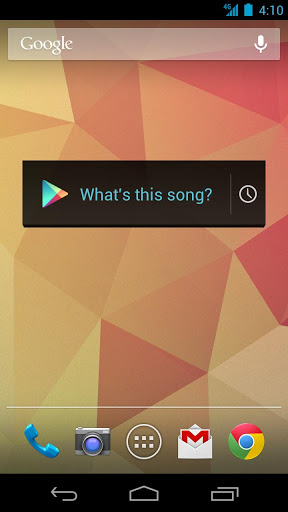
What's this song?” Starting today, the Sound Search for Google Play widget is available to download from the Play store, so you can start identifying music playing around you, directly from your Android device’s homescreen.


Sometimes, you hear a song you like while you’re out and about but don’t want to download it right at that moment. The Sound Search widget syncs across all of your devices, so that song you recognized with your phone in the coffee shop can be quickly purchased from your tablet at home.

For devices running Android 4.2, you can add the widget directly to your device’s lockscreen, letting you recognize songs without even unlocking your phone, making it even easier for you to catch that song at the club. 

The Sound Search for Google Play widget is available on Google Play for devices in the U.S. running Android 4.0 and above. After you’ve installed it, go to the widget picker and drag the Sound Search widget onto your homescreen. You can click on the widget at any time to start recognizing music around you.