Showing posts with label Play. Show all posts

Friday, 28 June 2013

Google Play edition device kernel sources now available for download

Google Play edition devices

Sources required to be available under the GPL are now ready for devs to take a look at

Right on time, the full kernel sources for both the HTC One and Galaxy S4 Google Play edition devices are ready for download courtesy of links from JBQ on the Android Building Group. For the enterprising developers that want (or need) it to work with for a deeper understanding of these two devices, the kernel source is a big resource to have available. This isn't at all unexpected, however, as the terms of the GPL require that it be made freely available.
It should also be noted that the availability of the kernel source for these devices doesn't mean that we have a full ROM or any proprietary binaries available. Things in this area are understandably still a little murky, and while we surely hope that those additional files that would give users a complete working ROM will be offered, nothing is guaranteed.
If you are someone who has a need for the kernel source and want to get right into it, you can grab a direct download for both devices from the "download" links below. HTCdev is also hosting an independent download from its own site for the HTC One.

Google+ and Google Play Music Updates bring small improvements

Well, the update Gods at Google have blessed Google+ and Google Play Music with some updates to their apps. You’ll notice some improved notifications to Google+ and some changes to the way sets of music are streamed via Google Play Music.
google music
Small update, important changes. / © Google/AndroidPIT

Google+ Notifications

If you were like me, you were probably annoyed by the fact that Google+ notifications weren’t syncing properly across multiple devices. You’d get a notification on your phone, check it and clear it away, only to find the notification still pending on your tablet or whatnot. Simple, but frustrating.
notifications a
Syncing read notifications across devices now works with Google+. / © Google
Well, that has changed now with this update enabling notifications that are read on one device, read on all devices synced to that account. A few other updates, including the redesign of the notifications tray and bell icon, were also a part of this roll-out.
notifications b
Some other small changes that were brought with the Google+ update. / © Google

Google Play Music: Faster and better streaming

With the abundance of choices for streaming music over the cloud, one of the biggest issues is the draw on the amount of data used by these services. Of course, you get music on the fly, but if you don’t have the data plan to back it up, you may be stuck with a larger than expected bill. Thankfully, in the latest update to Google Play Music, Google has now allowed you the choice between three streaming quality settings, allowing you to customize your data consumption for their app.
As far as we could tell, there really wasn’t any significant delay or loss of audio between the three settings (high, medium, and low quality), however the quality was definitely different. But, all things considering, that is to be expected when you compare a low quality versus a high quality setting. Apart from allowing users to choose different bandwith settings, Google Play Music also updated to shorten response times for downloading music from the App and its own internal search has been improved.

Google Play for Education: Developers now welcome

Google announced their intention to get into the education market last month during their I/O with Google Play for Education. Unfortunately, that was about all we saw of their service at the time as its been under wraps since then. Today, however, that changes as Google has put out the call for application submission for their education service.
googleeducation
© Google.com
As of today, developers that want their applications to be considered for Google’s educational storefront can mark them via the Play Developer Console.  One thing to take note, that unlike the normal Google Play Store and their “greenlight everything!” policy, Google will probably be a little more stringent on what passes on.  Each application that is marked to be used in the Google Play for Education store gets passed onto a third-party network of educators that performs a first-pass qualiftication of the apps. Not only that, all applications will need to follow the guidelines set out by Google.
education
 © Google.com
So, developers, do you think you’ve got something good for the K-12 environment?  The process follows a standard process: Test your app and ensure it’s optimized for Android tablets, upload your new/updated app, mark it for inclusion in Google Play for Education, and publish. The process itself should take about 3-4 weeks to complete. For more information on all the requirements, check out Google’s “Getting Started”.
And so, Google starts moving forward with their Educational portal, taking on the likes of Apple. While many schools would love to see the inclusion of modern technology into the classroom, they’re often constrained by tight budgets and other priorities.  Not only will this provide better options for teachers to use, but also provide them in a more affordable package and controls.

Thursday, 27 June 2013

Google Play Edition HTC One and Samsung Galaxy S 4 Available on Google Play Store


The Google Play editions of the HTC One and the Samsung Galaxy S 4 are available for purchase though the Google Play Store today. The Google Play editions of these flagship smartphones take the manufacturer software out of the devices, stripping away Samsung’s TouchWiz and HTC’s Sense UIs to deliver a pure Google experience. Both devices run on Android Jelly Bean, and will be among the first to receive important updates and Google goodies.
The handsets will come unlocked, allowing owners to choose a month-to-month contract or a pre-paid service option as they please.The device is not being sold outside of the U.S. however, so international customers will have to wait.
Both devices can be purchased through the Google Play Store, and will be shipped to customers starting on July 9th. The Samsung Galaxy S 4 comes with a price tag of $649 for the 16GB version, and the HTC One comes with 32GB of storage and is a little cheaper than the S 4, coming in at $599. So head on over to the Google Play Store if you’ve got your eyes on one of these powerful, pure Google experience touting  devices.

Sunday, 23 June 2013

Introducing Magazines on Google Play for the UK

Following hot on the heels of the recent launch of music on Google Play in the UK, we’re pleased to announce that from today, you’ll also be able to buy digital versions of your favourite magazines for reading on the go

Popular titles from some of the world’s leading publishers such as Condé Nast UK, Dennis Publishing, Future, Haymarket, Hearst UK, Immediate Media and IPC Media are now available for purchase on your Android phone or tablet. 

Get in shape with Men’s Fitness, cook up a storm with olive, work off all that turkey and Christmas pudding with Slimming World, catch up on the latest must-have gadgets with T3 and read a preview of The Hobbit in this month’s edition of Total Film.

You can stay abreast of the week’s key events with Hello!New Statesman and The Spectator and keep on top of the latest lifestyle news with CosmopolitanGlamour and Tatler. Petrolheads can pick out some new wheels with What Car?, while domestic goddesses can take their inspiration from Good Housekeeping

Browse the Play Store to find your favourite magazines, discover new titles with a 30-day free trial, buy single issues or purchase a money-saving monthly or annual subscription to leading titles such as ElleHarper’s BazaarVogue and Wired. New Nexus devices even come pre-loaded with free issues of Men’s Fitness, .net and Vogue to get you started. 

All your latest issues will be instantly available on your Android tablet or phone, or online, using our web reader, and organised in your collection in the cloud. You can flip through your magazine carousel to quickly decide what to read next or simply search for a specific title in your magazine collection. 


Magazines are available today to enjoy on the sofa or on the go via your Android devices and on play.google.com, so please take a look. 

Saturday, 22 June 2013

Turning the page with a new Google Play Books app for Android

Google Play Books enables you to read more than 4 million books on the go, and it's available in the U.S., Canada, Australia, Germany, Spain, Italy, France, Korea and Japan. Today we’re bringing new features to the Books app to help you better explore your books and understand what you’re reading.

Places and dictionary 
School’s now in full swing and students are picking up the classics. Whether you're diving into Moby Dick or trying your hand at some Tolstoy, we want to make your reading experience as enjoyable and rewarding as possible. Starting today, when you come across an unfamiliar geographic location—a faraway city or distant mountain range—you can tap on the location to learn more about it. You’ll see an info card with a Google Map and the option to get more information by searching on Google or Wikipedia.

Explore locations using info cards in Turn Right at Machu Picchu: Rediscovering the Lost City One Step at a Time

Similarly when you come across an unfamiliar word (say, abligurition or jentacular), just tap it for a quick definition.

Translation
For those adventurous readers making their way through books in non-native languages, you can now easily translate words or phrases to and from a number of languages. Just select the text or word and use the button on the top action bar to indicate which language you’d like translate into.

Highlighting and notes
If you happen to page through any of the books on my shelf, you’ll likely find highlighted passages and illegibly scrawled notes in the margins. Starting today, our app lets you highlight text and easily take notes. And because all your books live in the cloud, highlights and notes sync on your tablet, phone and the web.


You will also notice a new sepia reading theme (in addition to the current day and night themes), 2D sliding page turn animation, and lots of stability improvements. Finally, you can now read Japanese books in a vertical, right-to-left layout—and flip pages from right to left.

We hope these features make reading more enjoyable—and productive.

Get inside your favorite movies with Google Play

“What’s his name again? Wasn’t he the guy in that movie with the battle of the bands?” Now, while you're watching a movie on Google Play, you can find out that it’s Jack Black (of course!), who was born in Hermosa Beach and is 43 years old. And with one click you can search the web and learn the fun fact that his parents are both rocket scientists.

We’ve added info cards to the Google Play Movies & TV app so you can easily learn more about the actors, related films and even what song is playing in many of your favorite movies. When you’re watching a film on your tablet, simply press pause and cards will pop up with information about actors on screen. You can tap on an actor’s face to learn more about him, like his age, place of birth, his character in the movie, and his recent work, or scroll through the info cards to learn more about the movie or soundtrack. When you resume the movie, the cards will disappear.


This new feature is offered for hundreds of movies in Google Play and we’re adding more every day. If you’re in the U.S. and have a tablet running Android 4.0 (Ice Cream Sandwich) and higher, download the latest version of the Google Play Movies & TV app to check it out. We hope to bring info cards to more movies in more countries and devices soon.

Play this: avoid the music in 'Soundodger,' an abstract arcade game

SoundodgerGames like Everyday Shooter and Wave Trip have you creating music through gameplay, but Soundodger goes in the opposite direction — the goal is to avoid the music. You play as a tiny circle, and as the music starts to play little triangles will start firing in your direction like missiles in time to the beat. Avoiding them is incredibly simple: All you need to do is move the mouse cursor to get out of the way. You also have the ability to slow down time when things get particularly hectic. You can't actually lose in Soundodger — messing up will simply rewind the track briefly — but getting a 100 percent score can be a challenge, especially on some of the tougher levels.
The simple, minimalist visual style really helps you get into a distraction-free zone while playing, but the real highlight of the game is its soundtrack. Soundodger features songs from a number of notable artists, including Fez (and Fez 2) composer Disasterpiece, and both the variety and quantity is pretty impressive, especially for a completely free browser game. And after you play a song through once, you can replay it in a "zen mode" where you don't have to worry about messing up. You can check it out now at the source link below, and a downloadable version is also in the works for both Windows and Mac, presumably with a few added features and tracks.

Sony says it will fix unusable PlayStation 3 software with a June 27th patch

Sony PlayStation (STOCK)

A couple of days ago, many PlayStation 3 owners found that the latest version of Sony's firmware locked up their systems, causing the PS3 to hang indefinitely at startup. Sony quickly took version 4.45 of the software offline, saying it would work to resolve the problem. Now, PlayStation Europe has said that a fix is coming on June 27th, hopefully across all regions — though it hasn't been posted on the main PlayStation Twitter account
.

Wednesday, 19 June 2013

HTC offers a $25 Google Play gift card to U.S. citizens buying HTC One between now and July 15th

HTC offers a $25 Google Play gift card to U.S. citizens buying HTC One between now and July 15th
After testing the free $25 Google Play gift card offer with three of Canada’s largest carriers, HTC is bringing it to the United States. Under the deal, anyone who bought the HTC One and activated it in the U.S. between now and July 15th will get a $25 voucher to use for apps and games.
There is a limit of one registration per email account, and codes will be delivered to registered email address within 72 hours of registration.
So if you do grab the HTC One, head over to this page to leave your email, and expect a response with a voucher that you can redeem for some free stuff. It’s that easy. ;)
And we want to know – what will you spend that money on?

Tuesday, 18 June 2013

Turning the page with a new Google Play Books app for Android

Google Play Books enables you to read more than 4 million books on the go, and it's available in the U.S., Canada, Australia, Germany, Spain, Italy, France, Korea and Japan. Today we’re bringing new features to the Books app to help you better explore your books and understand what you’re reading.

Places and dictionary 
School’s now in full swing and students are picking up the classics. Whether you're diving into Moby Dick or trying your hand at some Tolstoy, we want to make your reading experience as enjoyable and rewarding as possible. Starting today, when you come across an unfamiliar geographic location—a faraway city or distant mountain range—you can tap on the location to learn more about it. You’ll see an info card with a Google Map and the option to get more information by searching on Google or Wikipedia.

Explore locations using info cards in Turn Right at Machu Picchu: Rediscovering the Lost City One Step at a Time

Similarly when you come across an unfamiliar word (say, abligurition or jentacular), just tap it for a quick definition.

Translation
For those adventurous readers making their way through books in non-native languages, you can now easily translate words or phrases to and from a number of languages. Just select the text or word and use the button on the top action bar to indicate which language you’d like translate into.

Highlighting and notes
If you happen to page through any of the books on my shelf, you’ll likely find highlighted passages and illegibly scrawled notes in the margins. Starting today, our app lets you highlight text and easily take notes. And because all your books live in the cloud, highlights and notes sync on your tablet, phone and the web.


You will also notice a new sepia reading theme (in addition to the current day and night themes), 2D sliding page turn animation, and lots of stability improvements. Finally, you can now read Japanese books in a vertical, right-to-left layout—and flip pages from right to left.

We hope these features make reading more enjoyable—and productive.

Bringing Google Calendar to the Play Store

Previously available only on select Android devices like Nexus S and Galaxy Nexus, you can now download the official Google Calendar app for Android from Google Play. Google Calendar makes it easy for you to manage all your calendars in one place, including those from your Google accounts and other calendars synced to your Android device. Beyond supporting the basics such as creating, editing, deleting events and responding to invitations, the new Google Calendar app has extra features that help you manage your time and communication more easily: 
  • Snooze events directly from a notification if you’re not quite ready and want to be reminded later.
  • Use predefined messages to send quick "I'll be late" updates to your event participants directly from the notifications or the event itself (of course, you can always write your own).
  • Pinch to zoom in and out of a day.
  • Set a home time zone to help you manage your time better when traveling.
In addition, we also expanded the sync period so you can review past events from up to one year ago directly on your device. Download Google Calendar on Google Play today for devices running Ice Cream Sandwich (4.0.3+) or Jellybean. Use the Google Feedback feature in the app to let us know how we can make Calendar work better for you!


Introducing Magazines on Google Play for the UK

Following hot on the heels of the recent launch of music on Google Play in the UK, we’re pleased to announce that from today, you’ll also be able to buy digital versions of your favourite magazines for reading on the go

Popular titles from some of the world’s leading publishers such as Condé Nast UK, Dennis Publishing, Future, Haymarket, Hearst UK, Immediate Media and IPC Media are now available for purchase on your Android phone or tablet. 

Get in shape with Men’s Fitness, cook up a storm with olive, work off all that turkey and Christmas pudding with Slimming World, catch up on the latest must-have gadgets with T3 and read a preview of The Hobbit in this month’s edition of Total Film.

You can stay abreast of the week’s key events with Hello!New Statesman and The Spectator and keep on top of the latest lifestyle news with CosmopolitanGlamour and Tatler. Petrolheads can pick out some new wheels with What Car?, while domestic goddesses can take their inspiration from Good Housekeeping

Browse the Play Store to find your favourite magazines, discover new titles with a 30-day free trial, buy single issues or purchase a money-saving monthly or annual subscription to leading titles such as ElleHarper’s BazaarVogue and Wired. New Nexus devices even come pre-loaded with free issues of Men’s Fitness, .net and Vogue to get you started. 

All your latest issues will be instantly available on your Android tablet or phone, or online, using our web reader, and organised in your collection in the cloud. You can flip through your magazine carousel to quickly decide what to read next or simply search for a specific title in your magazine collection. 


Magazines are available today to enjoy on the sofa or on the go via your Android devices and on play.google.com, so please take a look. 

Monday, 17 June 2013

Sound Search for Google Play widget, now available on Google Play

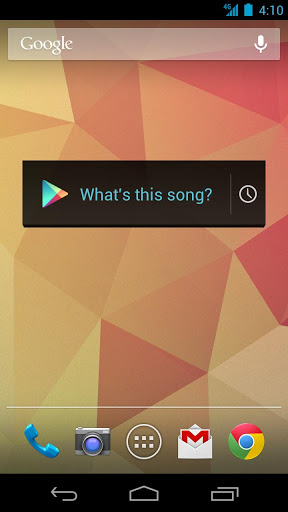
What's this song?” Starting today, the Sound Search for Google Play widget is available to download from the Play store, so you can start identifying music playing around you, directly from your Android device’s homescreen.


Sometimes, you hear a song you like while you’re out and about but don’t want to download it right at that moment. The Sound Search widget syncs across all of your devices, so that song you recognized with your phone in the coffee shop can be quickly purchased from your tablet at home.

For devices running Android 4.2, you can add the widget directly to your device’s lockscreen, letting you recognize songs without even unlocking your phone, making it even easier for you to catch that song at the club. 

The Sound Search for Google Play widget is available on Google Play for devices in the U.S. running Android 4.0 and above. After you’ve installed it, go to the widget picker and drag the Sound Search widget onto your homescreen. You can click on the widget at any time to start recognizing music around you.

A fresh new look for Google Play

Whether you’re in the mood to listen to Justin Timberlake’s new album, read Harlan Coben’s latest bestseller or discover a new game to play, you want the experience of finding and making your purchase to be quick and easy. Today we’ve started rolling out a redesigned Google Play store on Android phones and tablets that is simple, clean and — most importantly — helps you find great entertainment, fast.


The new design focuses on bigger images that jump off the page. Similarly themed content is grouped together so you can hone in on a magazine to read or an app to try. As you move down the page, new recommendations continue to appear so there is always more to see and explore. We’ve also simplified purchasing so you can breeze through checkout and get to enjoying your movie rental or other content.


The redesigned Google Play store app starts rolling out today for Android phones and tablets running Android 2.2 (Froyo) and above. People around the world should see it over the next few weeks. Get ready for a simpler Google Play.

Android@I/O: Just press Play

As our developer audience knows, Android is more than simply a phone or tablet. It’s a platform, an ecosystem, and an opportunity for developers around the world to build exciting services and apps that reach millions of people every day. The flexibility and openness of Android provides developers--and Google, through services like Google Now--the opportunity to build simple, beautiful experiences across multiple devices.

Here’s a quick look at what we announced today at Google I/O, our annual developer conference:

Developers, the heart of Google Play 
Just a year after launch, there are now more ways than ever for developers to monetize their apps in Google Play, and for users to discover and enjoy apps and entertainment. We’ve passed 48 billion app downloads, with more than 2.5 billion downloads in the last month alone. Today, we launched a range of new tools, including services for game developers. For users, this means that you’ll be able to challenge your friends on Google+ to real-time multiplayer competitions, or race against them to the top of the leaderboards. (Check out a few of our favorites: World of GooSuper Stickman Golf 2Beach Buggy BlitzEternity Warriors 2, and Osmos).

Our library is your library: Google Play Music All Access 
Google Play Music All Access is a new monthly music subscription service that lets you listen to millions of songs across your devices. You can create a radio station from any song or artist you love, browse recommendations from our expert music team or explore by genre. And when millions of songs just aren’t enough, Google Play Music lets you combine our collection with your own collection. You can store 20,000 songs for free in the cloud and listen to them alongside the All Access catalog. It’s $9.99 a month, and you can try it free for the first month. Or better yet, start your trial by June 30 and you’ll pay only $7.99 a month.


Google Play for Education: Android goes to school 
Imagine a world in which all classrooms and students are connected to the web. While such a vision will take the efforts of many, Google has contributed to this endeavor through Google Apps and Chromebooks. Today we are excited to expand Google’s education offering by combining the ease and portability of Nexus tablets with highly engaging educational content. Through this new program educators will be able to manage tablets and discover, purchase, and distribute content through Google Play for Education--whether they're in charge of one classroom or one thousand. We’re inviting developers to get started now to create world class educational apps for grades K-12. Schools interested in learning more can sign up here.

Samsung Galaxy S4 on Google Play 
Next month, we are adding a new Android device to the store to join our current lineup of Nexus phones and tablets. We’ve worked closely with Samsung to create a special Samsung Galaxy S4 exclusively for Google Play. It brings together cutting edge hardware from Samsung with Google’s latest software and services -- including the user experience that ships with our popular Nexus devices. Starting June 26, it will be available with no contract for $649, supporting both T-Mobile and AT&T, with LTE.