Showing posts with label you. Show all posts

Friday, 28 June 2013

What does your smartphone cover case say about you

Your smartphone home screen, like we say in our past report, is like a peep hole into your personality. The same could be said for the protective casing that you've chosen, which is also an identification of who you want to present yourself as. After the study we undertook about the various home screen stereotypes, it's now time to check out what your cover case has to say about your character. Whether you're the Playboy bunny teenie-bopper, the hipster, the hoity-toity swankster, the belt-holder type or mother nature's child, at the the end of the day, it's easy to recognize all of types. What does your smartphone case say about you?
case teaser pic
Here's another round of ''which type are you?'' © Illusive Photography/flickr.com/AndroidPIT

Mother Nature's Child

You love freedom and like to keep it real, whether it be regarding hairy armpits or your smartphone! You love keep your phone ''au natural'' and cover-free because it just feels so much more ''organic''. Truth be told, you're the only type who actually really takes advantage of the headset's manufacturer design. According to your lifelong philosophy, you aren't high maintenance and that goes for your smartphone as well. Living on the edge is your motto. Who cares if it drops? That's what tape is for. At some point in time you can send your kids Rainbow, Star Dust and Unicorn to go work for you so that you'll have enough money to get the Samsung Galaxy....S16.
Naturbursche 2
You're the Robinson Cruise of smartphones with a animal skin loin cloth and a broken smartphone. © Jardín Botánico Nacional, Viña del Mar, Chile/flickr.com/AndroidPIT

The Playboy Bunny Teen

You haven't yet reached the age of 18, but you're young, happy and live for today. Your passions include fake tans, looking absolutely fabulous all the time and Justin Bieber. Also, as a Paris Hilton mini-me, you are convinced that sticking rabbit ears, devil horns, penguin fins or bunny tails on your case will perfectly show off your own individual personality. If there's something that could describe you and your life, that would be ''YOLO'' or whatever other term is now all the rave.
At the moment, you're living your teen years to the motto of the Lana Del Rey Song ''Young and Beautiful'' but in three or four years when you look back at old pictures you will differently shake your head and say ''what was I thinking?'' By that time, your playboy bunny case will have landed in the garbage long ago.
Tussi Schutzhuelle
Teens angst isn't an issue for you like others going through puberty because you are just oh so fabulous with your Playboy bunny case. / © Avarty/flickr.com/AndroidPIT

The Retro Hipster

It's important for you show the world how ''oh so 90s'' you've remained (even if you were born in 2000+). That is precisely why you decided to deck yourself in retro technology and your phone looks more like a game boy, NES controller, a cassette or any of these praised objects that you cling on to for dear life. If your hair looks like you last washed it in the 90's and your pants are tight and full of holes as if mom bought them for you when the Backstreet Boys were cool, then shouldn’t your expensive smartphone also need to play the part as well? I guess authenticity does have its limit after all.
Hipster Schutzhuelle
The Retro Hipster lives in the past like no other. The fact that this person just spent over 600 dollars on the new Samsung Galaxy S4 is kept on the down-low for the fear of ''selling out''. / © David Fisher/flickr.com/AndroidPIT

The Hoity-Toity Swankster

For your smartphone case, it must absolutely look as if something died first because for you this signifies something deep, meaningful and of high-value. Whether it be the big anaconda, the American buffalo, the Bengal tiger or a baby robin, you aren't too choosy. And if there isn't an animal skin stuck to your phone, then you at least have some African diamonds from Wal-mart, sorry, Swarovski which are intricately sewn unto silk made from a million silk worms who had the honor to give up their lives for this noble cause. Thankfully, you aren't really that heartless like your case suggests since you actually only buy imitations. For the original stuff and the necessary material, you don't actually have enough money nor the callousness: that's your own little ''secret''.
Edelschnoesel Schutzhuelle
The Hoity-Toity Swankster loves haute couture and design and would die for that anything Dior. But all that dies in the end is common sense. / © Fashionista's/flickr.com/AndroidPIT

The belt-holder guy

Order and efficiency is the end all and be all for this dude. If we could take a time machine back a few years when you were still a young lad, you already had your Nokia mobile phone strapped onto your belt for safe-keeping. At the time you felt like John Wayne when in front of the mirror practicing flipping out your phone from your belt to your ear in one sexy and smooth move. As other kids in the bus laughed about your Batman-like belt packed full with phone, Swiss army knife, pen set and first aid kit, you thought it was quite the handy-dandy nifty thing. At the time, you already felt a little too old to be cool. Now you're the CEO of a company and nobody can laugh at your awkward ways.
Geek

Google Interns make more money than you

While most people might associate an internship as the toil and struggle, usually unpaid, that young students or recent grads need to go through in order to make it in the business world, there seems to be a silver lining in some companies. Most notably, companies based around Silicone Valley seem to not only treat their interns well, but they're probably paid more than you are.
intern
Hey Google, want to hire me? / © Google.com
If you're like me, the job search after University was a particularly fun time. Applying to job postings through the Universities job database. Writing and rewriting my resume to match the needs of each specific job. Even going out and applying for some unpaid internships with companies just so that I could get my foot in the door and maybe, hopefully, work my way to a paying position.
However, if I had been one the lucky chosen to work for, say, Google, I’d be laughing right now.  On average, interns are paid roughly $5,800 a month, in US dollars. And that’s for the “less specialized” ad sales or marketing positions. If you’ve got the savvy to be a software engineer, you could be rolling in almost $6,700 a month.  Most of these placements require the interns to at least commit three months of full-time work at the company, so interns can expect to roll in about $20,000 during their stint. Not too shabby!
And while, this may seem a tad bit high, when it comes to the competitive tech industry, highly sought after candidates are rewarded handsomely for the work that they do in order to keep them around. Google isn’t the only company relying on high compensation to attract prospects: Microsoft also ranks pretty high paying Research Interns, on average, $7,000 a month.
Money may not be everything though, as Google is still ranked tops when it comes to job satisfaction, so it’s not surprise that it’s one of the best places to work. On the flip-side, do take heed, Google is also regarded as having the toughest interview process in the industry.

Chromebooks are coming to a store near (and far away) from you

Chromebooks have been available through online portals for some time now. If you ever wanted to get your hands on one, you could easily navigate over to Amazon, Best Buy, and even Google itself.  But soon you’ll be able to see these Chrome OS laptops popping up in retailers across the globe, in fact, in over 6,600 stores around the world.
CB 8
Google has announced that the Chromebooks will now be available at select locations, including Walmart and Staples by this coming weekend. As well, other locations such as Office Depot, Office Max, Fry’s, and TigerDirect will start seeing these show up in the coming months.
In a more global perspective, Google has also focused over the pond with select locations being added in the UK, Netherlands, France, Sweden, and Australia. As with everything Google does, more locations are expected to be announced in the near future.
Well, that certainly puts Chromebooks in reach of more consumers by expanding their retailer base by almost three. As someone who likes to get a hands-on experience of a device before committing to buying, this will certainly be handy in the near future. I'm sure I'm not alone when it comes to that.

Wednesday, 26 June 2013

The Xperia Z Ultra, Sony’s Mini-Tablet Sized Phone, Wants You To Talk Less & Watch More

xperia-z-ultra-vs-xperia-z

Sony is steering its mobile ship into deeper waters with the Xperia Z Ultra. The 6.4-inch device (above, left) slots in the size gap between its former flagship handset, the 5-inch Xperia Z (above right), and its 10.1-inch Android slate, the Xperia Z Tablet. The Xperia Z Ultra might have more sensibly been named the Xperia Z Tablet Mini. Instead, Sony has hedged its bets with a name that doesn’t exclude either possibility: for some people this is a really big smartphone, for others it’s a highly portable small slate.
I got hands-on with the newest addition to Sony’s line up at a press event this morning. First impressions: there’s no getting away from the sheer size of this beast. The Xperia Z Ultra is a mammoth. It’s huge, crazy huge. It looks more like a mini tablet than a phone when you see it wielded in anger, which likely explains why Sony has felt the need to make a dummy handset accessory (powered by Bluetooth) so you don’t have to hold this slab up to your face. Doing that is going to invite ridicule unless you’re one of those Ballmer-sized business men with hands the size of dinner plates.
Even holding the Ultra in one hand feels a little ridiculous if you have smaller hands than average, like myself, but its slender profile (just 6.5mm) helps — meaning it doesn’t feel too palm-stretching. The main offsetting factor is a very lightweight feel. It’s surprisingly light in the hand (212g) for such a large device. You could happily hold it in one hand and not worry about getting wrist-ache. And if you can find a pocket on your person big enough to accomodate the Ultra it won’t feel like a drag, even if it drastically reduces your ability to bend.
Sony says the Ultra is about a third bigger than the Xperia Z (and has a third-extra in battery capacity too, so it’s still good for about one day’s use before needing a charge). And at 6.4-inches it’s considerably larger than Samsung’s 5.5-inch Galaxy Note II, and fractionally larger than Samsung’s newer phablet, the 6.3-inch Galaxy Mega. Rumours around the Galaxy Note refresh suggest Samsung is contemplating adding a 5.9-inch pane on the next iteration. Sony has evidently decided its worth making an even bigger splash with its own phablet foray. But with the Xperia Z already sitting on the cusp of phablet sizing, with its 5-inch pane, supersizing the sequel is the natural next step.
Sony talked up how consumer demand for bigger screens is growing — apparently as fast as the screens themselves are swelling. The likely reason for that, as I have previously argued, is that people are using smartphones for more rich media consumption and visual computing uses more of the time – fuelled by apps and high speed connectivity — rather than for talking on the phone. Screen size is therefore inflating to adapt to shifting use. And Sony reckons it’s well placed to capitalise on the momentum powering media consumption — thanks to its sprawling entertainment empire.
As with its other Xperia devices, Sony’s Android skin foreground access to this media content. Sony is hoping its content empire can become a differentiating force in the mobile devices space — and help it stand out in the crowded Android OEM segment. As with Sony other current Xperia devices, the Xperia Z Ultra is preloaded with its Walkman app providing access to music downloads and its Music Unlimited streaming service; Movies for video content, including access to Sony’s Video Unlimited store for renting or buying films; and PlayStation Mobile for accessing its games app store. There’s also Sony Reader for browsing and downloading ebook content.
Elsewhere, Sony has kept its Android tweaks to a minimum so there’s little getting in the way of enjoying Android 2.2 Jelly Bean as Google intended. The device felt slick and fast during my brief hands on, with no obvious signs of lag. The phone’s engine is a beefy 2.2 GHz quad-core chip (Qualcomm’s Snapdragon 800 processor) — possibly the first device to pack that CPU. It also includes 4G/LTE for high speed cellular connectivity.
The hardware design of the Xperia Z Ultra follows the same mold as the Xperia Z and Xperia Z Tablet. There are no showy embellishments. What you get is a clean, relatively blunt-sided high gloss slab (or at least it’s clean until you touch it, when the high gloss becomes a fingerprint magnet). The user’s eye is clearly intended to fall squarely on the screen — where Sony gets to really strut its stuff, by pulling in IP from its Bravia TV division to amp up the colour clarity and video playback experience on the handset. The Ultra is also the first device in Sony’s Xperia line-up to be badged with its latest Triluminos TV tech, which it said supports a greater range of colours.
The screen looked plenty bright during my hands on but as with other Sony mobile screen it’s not as saturated as Samsung’s high end AMOLED screens typically are. Sony opts for more true-to-life colourings with its display tech. The Xperia Z Ultra’s big, bright full 1080p HD pane obviously comes into its own for consuming video content. You can image the device being a handy travelling companion for watching TV shows and movies on the go, assuming you don’t want to lug around a full-fat tablet. Or for watching TV in the bath — being as the Ultra is waterproof. Gaming is also likely to work well with so much screen space for mashing virtual buttons.
The Ultra’s large physical size (179.4 x 92.2 x 6.5 mm) does mean typing can require two fingers to reach all the keys. But Sony has a software fix for that. It’s added a one-handed keyboard option which allows the user to switch from a screen-filling QWERTY to one which compacts into the right or left hand corner, depending on your choice (so that both right- and left-handed people can use it). So that’s pretty neat. You can of course further augment the Android keyboard experience by downloading alternative third party apps.
Sony has also added support for stylus input on the Ultra — presumably taking another cue from the Galaxy Note — for taking notes, sketching and for handwriting recognition. In a laudable move — especially for Sony, once the king of propriety accessories — there’s no specific stylus required here. You can draw on the screen with a pencil. Or even a fingernail.
To sum up, the Xperia Ultra Z feels like it has a lot going for it. Sony is refining its Android play to zero in on media consumption. And if it’s content you want to consume, then a 6.4-inch screen is exactly the sort of thing you’ll want in your pocket. Or, more realistically, in your handbag/manbag. Flagship smartphone screens aren’t getting any smaller either, so even if the Ultra feels like it’s pushing the screen size envelope a bit far right now, it’s unlikely to remain the biggest phablet in phablet-town for long.

Tuesday, 25 June 2013

Want a Gold Plated HTC One? It’ll Only Cost You $2,900!

gold_htc_one_1_1

Goldgenie, the company responsible most recently for the gold Blackberry Q10, has done it again. Now a gold or platinum HTC One can be yours, though it’ll cost you a pretty penny. The gold-plated One is retailing for about $2,900 American!
Famed for introducing the Gold Superstar iPhone series to the market along with the Gold Samsung S4, global gold-plating giants Goldgenie are releasing another world first: the Gold HTC One phone.
Retailing prices start at £1895, Goldgenie’s Gold HTC One phone is available in a choice of Gold (£1895), Rose Gold (£1995), or Platinum (£2095) plating. Featured in either Silver or Black, users can choose 32GB or 64 GB of memory. All phones are delivered in a beautifully customised Goldgenie box, making this a complete gift-to-go.
If you want some bling bling on your ring ring, you better be prepared to pony up the big bucks!

Thursday, 20 June 2013

Windows 8.1 to let you secure folders with your fingerprint


Windows 8.1 will have a couple of tricks up its sleeve for people who use fingerprint readers.
One of Monday's sessions at Microsoft's TechEd conference highlighted the support that Windows 8.1 will offer for fingerprint recognition, as described by The Verge. Prior versions of Windows handled fingerprint readers through third-party software. But Windows 8.1 will be the first edition of Windows to natively support the technology.
Users will be able to log into their PCs via a Microsoft Account, purchase apps, and open different programs with a swipe of the finger. They'll even be able to lock down certain folders so they're accessible only through a fingerprint.
Microsoft is "working very closely" with two or three manufacturers to outfit Windows 8.1 with the necessary fingerprint support, according to The Verge. The company is also asking more manufacturers to outfit their laptops, tablets, keyboards, and mice with fingerprint readers.
"You'll begin to see these be more pervasively available just to make it that much easier to log in to Windows," Microsoft's Stephen Rose said, The Verge added.

How Windows 8.1 upgrades will get to you


Windows 8.1 start screen
With the public preview builds of Windows 8.1 due out later this month, a number of users are wondering how Microsoft plans to handle the upgrade.
At TechEd North America, officials shared some details on that topic in a session entitled "Windows RT in the Enterprise."
Microsoft officials have said previously that the company plans to deliver the public preview of Windows 8.1, codenamed "Blue," via the Windows Store on June 26.

What's new in Windows 8.1 (pictures)


Scroll Left
Scroll Right
Microsoft Senior Product Marketing Manager Michael Niehaus reiterated that message in the RT in the Enterprise session on Tuesday. When the 8.1 preview is available, Windows 8 and Windows RT users will receive a Windows Update notification. That update will trigger the new bits to show up in the Windows Store, where potential testers will be able to read the description and choose whether or not to install.
Once the final versions of Windows 8.1 are available, after their release to manufacturing, those who have downloaded the preview will get the same Windows Update plus Windows Store notification. While their data and accounts will be preserved if and when they choose to install the free, final 8.1 release, all their apps must be reinstalled, Niehaus said Windows 8 users who do not install the preview build and opt instead to go straight from Windows 8/Windows RT to Windows 8.1 will not have to reinstall their apps. All settings, data and apps will carry over, a spokesperson said when I asked. Users will be able to decide when and if they want to move from Windows 8 and Windows RT to the 8.1 versions, officials stressed.Even if testers opt instead to roll their devices back to Windows 8 after installing the preview bits, they still will have to reinstall their apps once they move to the RTM version of Windows 8.1.
Niehaus characterized the Windows 8 to 8.1 upgrade as "a little better" than how Microsoft handled the Windows 8 test build to RTM upgrade. A Microsoft spokesperson said the Windows 8 to 8.1 upgrade would be "comparable" to the Windows 7 to Windows 8 upgrade, in terms of how the upgrade dealt with user settings, data and apps.
Niehaus also told session attendees that Microsoft expects to have a reduced footprint size for Windows 8.1 as compared to Windows 8. He said the team has been working on removing old components, temporary files and improving NTFS compression to free up more space on users' machines. He noted that 4 GB of free space will be needed to install the Windows 8.1 preview builds. And he said that installation of Windows 8.1 will not result in the replacement of the recovery partition in Windows 8.

Monday, 17 June 2013

Me Books Brings Children’s Favorite Books To iPad, Lets You Be The Narrator

ipad_iphone_masterMany of the children’s e-book applications for iPad today use a combination of animations, video or even games to make books more “interactive” for their young readers. Me Books, a London-based digital e-book app and retailer launching today in the U.S., has a slightly different take. Instead of animation, the app uses audio to add an additional element to stories. The e-books are narrated, and include artwork that kids can tap to hear characters speak, too. In addition, readers (or their parents) can also record their own voices over the default narration to customize the experience even further.
Me Books is the latest creation to ship from the team at Made in Me, a studio originally founded back in 2009 by former visual effects artists James Huggins and his brother-in-law Mike Outlaw. In the pre-tablet era, the company had produced a series of desktop applications under the “Land of Me” brand, which allowed children to swap out the words in the story to change what happens within the interactive world of “Land of Me.”
That experience was later ported over to iOS, but co-founder Huggins admits that it never really took off. The app reached around 75,000 downloads versus the desktop version’s approximately quarter of a million.
So the company turned its focus in a new direction, and began to work on Me Books. But instead of thinking up new ways to change the content within the e-books themselves, Huggins and team focused on changing the overall experience, especially the audio, which he says is an under-utilized area.
me_books_new_v02
“It’s a very deliberate stance against taking – not new forms of storytelling, but taking physical books that we know – to the digital space in a way that respects the experience of reading a book,” Huggins explains.
The free app has been available in the U.K. since October where it’s been averaging 1,000 downloads per day and has now reached over 110,000 as of April. Today, it’s available worldwide, including here in the U.S.
Me_Books_ipad_read
Me Books ships with one title for free, then other books can be purchased for $2.99 (USD) within the app. Unlike some book apps where a large number of titles come from the public domain, Me Books’ titles come from publishers like Penguin, Harper Collins, Scholastic, Macmillan, Hachette, Puffin, Bloomsbury, and others.
“[The selection] is heavily curated, really diverse, but it’s never going to be exhaustive or comprehensive. It’s going to be numbering in the hundreds of books, rather than the thousands, but it will be a really good cross-section of books for children,” Huggins says. The app will include both classics and modern titles, as well as TV tie-ins.
Today, U.K. users have around 130 titles to choose from, while U.S. readers have 80 to 90 at launch.
Me_Books_ipad_bursting
However, the title selection and narration is still “very British” right now, says Huggins. And while that might work for something like “Peter Rabbit,” U.S. users who prefer a more American feel may want to wait for the forthcoming U.S.-based publishers and brands which will arrive in the app over the next couple of months, he suggests. (Or they can swap out the default narration for their own).
The company splits the revenue it earns with publishers 50/50 (after Apple’s take), and the app itself is free.
Based in London, the ten-person team had raised angel funding for “Land of Me” years ago, and raised from the same angels another small amount to get “Me Books” off the ground, but is preparing to raise a larger round in the near future.
U.S. users can now download the new app from here.

New Google Now: More of the information you need, at just the right time.

When computers do the hard work, you can get on with the things that matter in life.Google Now helps you do just that, giving you the information you need, before you even have to ask. Like updating you with flight times, pulling up your boarding pass when you arrive at the airport, or showing you the weather at your next travel destination. Today, we’re making Google Now even more useful by integrating new partners and making all your information even easier to access.

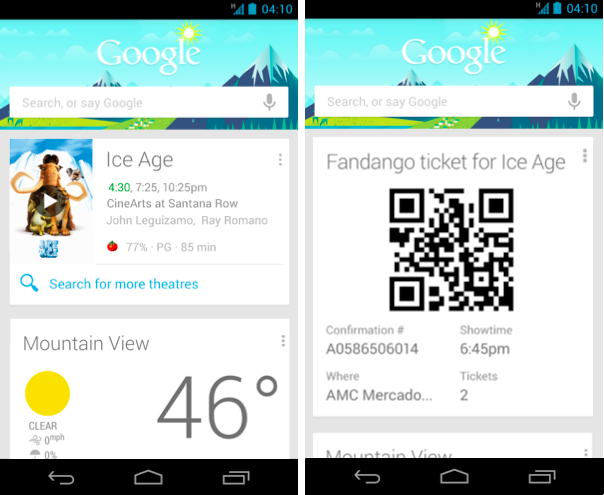
Going to the movies? Movie cards now include the latest ratings from Rotten Tomatoes, so you can pick the right movie. Purchase your tickets through Fandango, and Google Now will remind you when you need to leave for the theater, and pull up your tickets once you arrive.


In the market for a new home? Google Now can provide you with nearby real estate listings from Zillow. Plus, when you are checking out that remodeled kitchen at the open house, Now will automatically pull up more information about the listing.


Of course, all of this information is most helpful when it’s front and center and ready when you are. The new Google Now widget brings all your important Now cards to your home or lock screen, so you don’t even have to open the app.


When Google Now first launched last summer, we promised it was just the beginning, and it would continue to get better at delivering you more of the information you need, before you even ask. This is the fourth update since launch, and we’re just getting started!
To try out these new cards, get the latest version of the Google Search app for Android, available on Google Play for devices running Android 4.1 and above.